Canon PowerShot V1 Hands-On Review: A Compact Creator Camera
Smartphone cameras have become so good that buying a dedicated camera needs a little more justification than it used to. If the phone already sitting inside my pocket can take good photos, record 4K video and upload everything directly to social media, why should I bring another camera along? After spending time with the Canon PowerShot V1, I think the answer comes down to control.
A smartphone is still considerably more convenient, but the PowerShot V1 feels much more like I am actually creating the image rather than allowing a phone to decide everything for me. I have a proper optical zoom lens, physical controls, more direct access to exposure and color settings, and much more freedom to determine how the final photo or video should look. At the same time, it does not immediately throw me into the world of interchangeable lenses, giant camera bags and expensive professional rigs. That middle ground may be the PowerShot V1’s greatest strength.
Canon designed the V1 specifically around creators, giving it a 1.4-type CMOS sensor with approximately 22.3 megapixels for still photography, a built-in 16-50mm-equivalent f/2.8-4.5 lens for stills, 4K recording, a fully articulating display and even an internal cooling fan for longer video sessions. After using it for both photography and video, I found it to be the type of camera that makes sense for someone who has outgrown their phone but is not ready—or simply does not need—to build a serious camera rig.
Jeff Li
Pros
• Very good video quality
• Noticeable step up from smartphone shooting
• Good stabilization for handheld and walking video
• Larger sensor and much greater manual control
• Wide lens works well for creators and vlogging
• Responsive articulating touchscreen
• Clean and tactile physical controls
• Useful shortcuts and shooting presets
• Beginner-friendly despite extensive settings
• Built-in cooling fan for extended video recording
• External microphone and headphone connections
• USB-C and Micro HDMI
• Compact enough for everyday carrying
• No interchangeable lenses required
Cons
• Optical zoom range feels quite limited
• Powered zoom is smooth but cannot change framing particularly quickly
• Autofocus can occasionally focus on the wrong part of a scene
• Manual focus is not as quick to access as I would like
• Close-up photography can be frustrating
• Some controls are awkward when shooting one-handed
• An external microphone is still preferable for dialogue-heavy videos
Why Not Just Use A Phone?
This is probably the first question I would ask before buying a camera like the PowerShot V1. Modern phones are incredibly good at photography. They can automatically combine exposures, brighten shadows, sharpen details, stabilize video and even create artificial background blur before I have done anything other than press the shutter button. The PowerShot V1 requires a little more involvement, but that is also the appeal.
Compared with shooting on my phone, the V1 feels much more professional. The lens and larger sensor give the camera more to work with, but what I noticed just as much was the adjustability. Instead of choosing between whatever modes the phone manufacturer decided to expose to me, I can quickly change aperture, exposure, focus behavior, color settings and other parameters depending on what I am trying to capture.
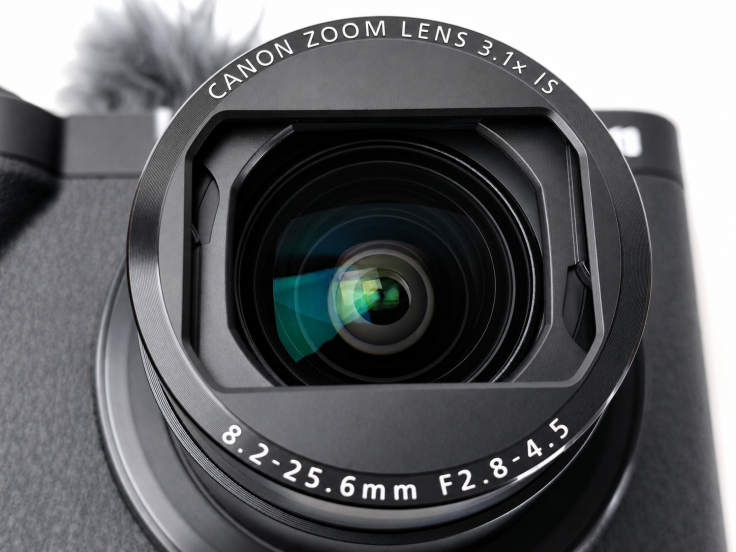
Canon’s 1.4-type sensor is larger than what is typically found inside compact cameras, while its fixed zoom lens covers approximately 16-50mm equivalent for still photography and around 17-52mm for video.
Jeff Li
Once I found the right adjustments, the photo quality was excellent. The difference is not simply that one device makes a sharper picture than another; the V1 gives me more ability to decide what kind of picture I actually want.
This also makes it a useful stepping stone for someone interested in eventually moving toward a larger mirrorless or professional setup. You can begin learning exposure, focus, shutter speed, aperture and other basic camera concepts without simultaneously having to figure out which lenses to purchase. You are learning how a proper camera works while still having one lens permanently attached to the front, which for a beginner, I think makes a lot of sense.
The Controls Feel Like Shortcuts
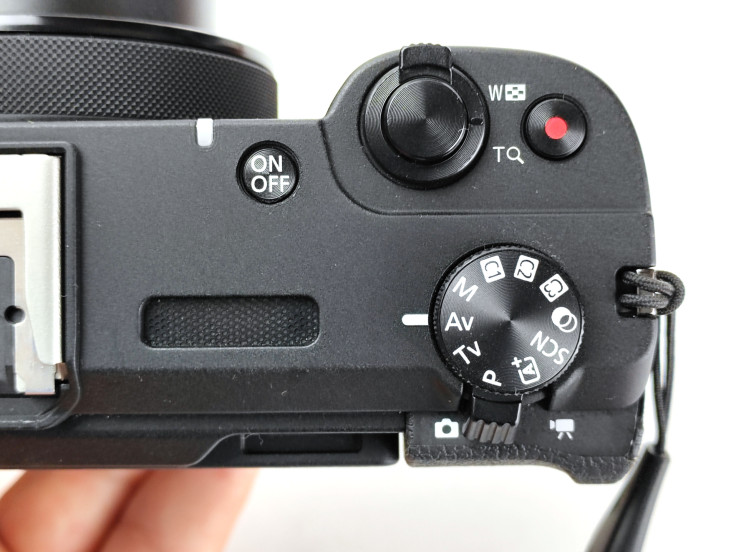
At first glance, the PowerShot V1 has considerably more buttons and dials than a phone, but after using it for a while, I stopped thinking of these controls as extra complexity. They started feeling like shortcuts. When I am holding the camera with two hands, the physical controls let me change common functions very quickly. Instead of touching the screen, opening another menu and tapping through several options, I can reach a button or dial and make the adjustment almost immediately.
The controls themselves also feel clean and tactile. There is something satisfying about changing a setting with a proper dial rather than dragging a finger across glass, and once I started remembering where everything was located, the camera became much faster to operate. Canon also provides custom shooting modes and numerous quick-access shooting settings, so presets can be used to return to familiar combinations without rebuilding the setup every time.
Jeff Li
I particularly liked having quick access to different presets and color-related settings. If I know the type of look or shooting condition I want, I can get close to it quickly rather than spending time reconstructing every option. This is one of the areas where the V1 manages to provide considerably more control than a smartphone without necessarily making everything feel more complicated.
There is a downside, however, because the controls work much better when I am holding the camera with two hands. If I am taking a photo one-handed, some of the buttons positioned beside the rear display become considerably harder to reach comfortably. This is where the small body starts working against the physical controls. With two hands they feel like shortcuts, while with one hand I sometimes find myself wishing everything were closer to my thumb.
The Touchscreen Makes Up For It
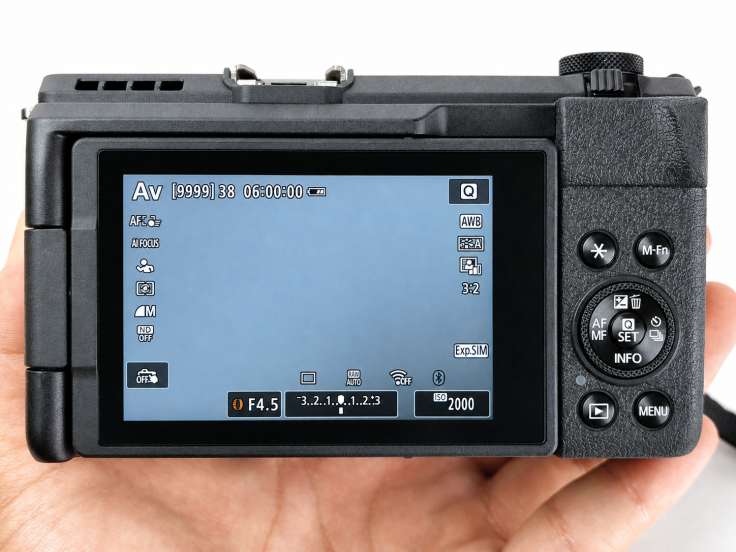
Fortunately, the touchscreen is very good and makes up for some of the limitations of operating the physical controls one-handed. The display responds quickly, and despite showing a large amount of information, I never found the interface unusually cramped. When I am shooting on the go and the physical controls are not convenient to reach, I can simply tap the setting on the display rather than trying to reposition my grip around the camera.
Jeff Li
The screen also fully articulates, which is a major advantage for video. Canon specifically designed the V1 with creators in mind, and the display can be positioned so that someone standing in front of the lens can still see the shot. There is also a front tally light to indicate when the camera is recording.
This makes filming yourself much easier. Without a screen facing me, I would have to guess whether I am properly framed, record a test clip, walk back around the camera and check it before trying again. With the V1, I can simply look at the display. That may sound like a small convenience, but if someone creates content alone, eliminating these little extra steps can save a surprising amount of time.
Video Is The Main Reason To Buy It
Photography on the PowerShot V1 is good, but video is where I think the camera really earns its place. The quality of the video is genuinely impressive for the type of camera this is. Canon supports uncropped 4K recording at up to approximately 30fps and cropped 4K at up to approximately 60fps, while Full HD high-frame-rate recording can reach approximately 120fps. The V1 also includes more advanced options such as Canon Log 3 and 10-bit recording for users who want additional flexibility when editing footage later.
Specifications only tell part of the story, however. What I liked was that getting good-looking video did not require turning every recording into a production. I can pick up the camera, get the brightness where I want it and start filming. Exposure adjustments are easy enough to make while recording, and I never felt like touching a setting would immediately ruin the clip I was already capturing.
This makes the V1 much more approachable for someone moving up from a phone. It gives me significantly more control, but I do not necessarily have to use all of that control every time I record something. There is enough here for someone who wants to experiment with more advanced video later, while the basic experience remains straightforward enough for casual filming.
The Zoom Is Smooth, But I Wish There Was More Of It
The powered optical zoom is useful during video because the movement itself is smooth. If I decide that the framing needs to be slightly wider or tighter while I am already recording, I can change it without creating the sudden jerky movement I might get from manually turning a lens. That smoothness makes the zoom look much more intentional on video.
However, I ran into two limitations, with the first being speed. If something suddenly happens and I want to quickly pull out to a much wider framing, the zoom does not move as quickly as I sometimes want it to. The slower movement looks good when I am deliberately zooming during a shot, but it becomes frustrating when I simply need to change framing immediately.
The second problem is range. The V1’s built-in lens covers approximately 16-50mm equivalent for still photography and around 17-52mm for movies, which explains why I found the wide shots much more impressive than the telephoto capability. Even photographing something from only a couple of meters away could leave me wishing for considerably more zoom.
This clearly is not a camera designed for photographing something far away, but for creators I understand Canon’s decision. A wide lens is much more useful when the person filming is standing only an arm’s length away from the camera, and it also works well for rooms, groups, travel scenes and general handheld video. I would think of the zoom more as a way to adjust composition rather than something designed to bring truly distant subjects close.
The Stabilization Is Better Than I Expected
One thing I was pleasantly surprised by during video testing was the stabilization. Canon combines optical image stabilization in the lens with Movie Digital IS, and in actual use I found the system quite effective at dealing with the sort of small movements that naturally happen when holding a camera by hand.
This was particularly noticeable when walking. Minor shakes from my hands and footsteps generally did not become obvious in the resulting footage, which meant I could walk around while recording without every little movement being transferred directly into the video. For a camera designed around casual creators and vloggers, this is important because carrying a gimbal everywhere would largely defeat the purpose of having such a compact setup in the first place.
There is obviously a limit to what any stabilization system can compensate for, and I would not expect the V1 to completely smooth out running or deliberately aggressive camera movements. For normal handheld filming and walking shots, however, I was impressed with how steady the footage looked. A tripod or grip is still useful for stationary shots or longer recordings, but I would not consider additional stabilization equipment necessary just to get usable handheld video from the camera.
Autofocus Is Good Until It Isn’t
The autofocus system can produce good results, but there were situations where it did not focus exactly the way I wanted. Canon uses Dual Pixel CMOS AF II on the V1 with subject-detection and tracking features, and most of the time this makes the camera easy to use. The problem appears when I have several objects in a scene and want more than one of them to remain clearly visible.
There were occasions where the camera decisively focused on one object and left considerably more of the rest of the scene blurred than I intended. Sometimes that looks great, since background blur can make a subject stand out and is one of the reasons someone might choose a dedicated camera over a phone in the first place. Other times, however, I simply wanted more of the photograph to remain sharp, and that is when autofocus could become frustrating.
Manual focus is available, but I also found it more annoying to access than I would like. If autofocus suddenly is not doing what I want, manual focus is exactly the type of control I want to reach immediately, yet it does not feel like one of the quickest adjustments on the camera. This is particularly noticeable because many of the V1’s other controls become quite intuitive once their locations are learned.
The Built-In Fan Actually Matters
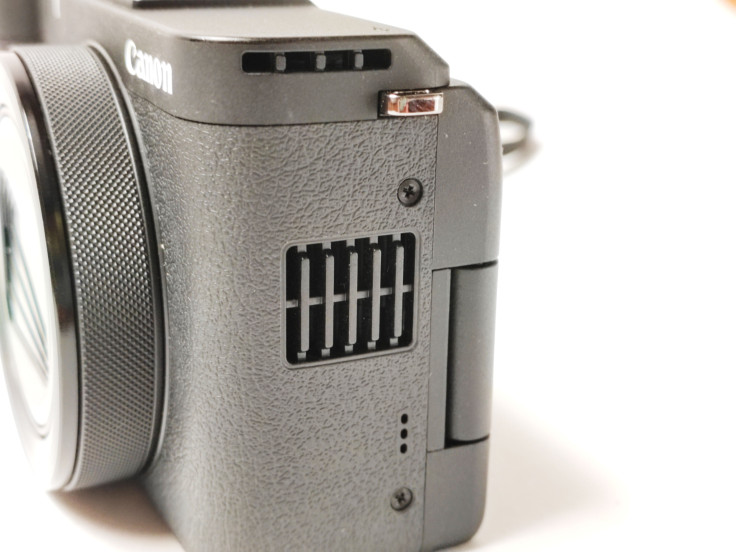
One feature I initially did not expect to see on a compact camera is a cooling fan, and it turns out to be one of the V1’s more unusual creator-focused features. Canon built a fan directly into the body so heat can be pulled away from the sensor during long recording sessions. Depending on settings and ambient conditions, the fan can operate automatically or at user-selected speeds, helping the camera handle extended video recording without heat becoming as much of a limitation.
Jeff Li
This is useful because video generates heat. A camera might produce beautiful footage, but that becomes considerably less impressive if it shuts itself down halfway through a long recording. For short clips, I doubt most people will think about the fan very much at all, but for interviews, podcasts, livestreams or other long-form recordings, it becomes considerably more valuable.
It also explains the vents visible on the camera body and is one of those features that makes the V1 feel like Canon was genuinely thinking about video rather than simply adding a video mode to a photography camera. A cooling fan may not be the first feature that catches someone’s attention, but for the people who actually need it, it could be one of the most useful additions.
For Talking, I Would Still Buy A Microphone
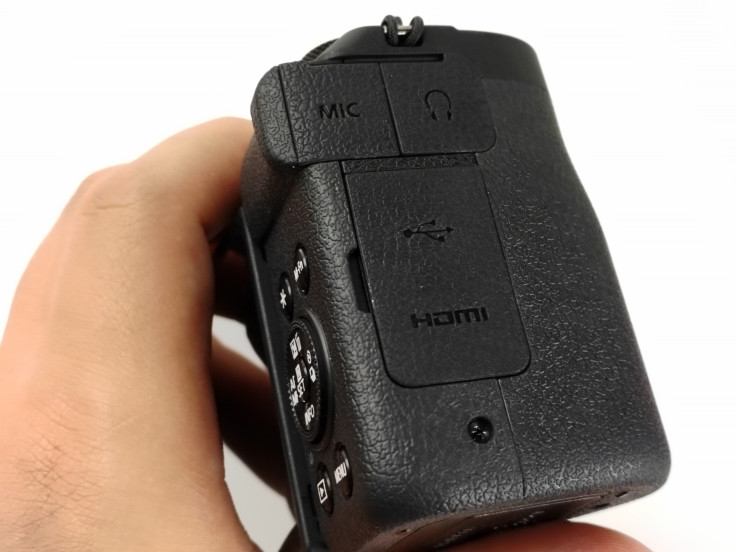
The V1 actually has a more serious built-in audio setup than I first gave it credit for. Canon includes three built-in microphones for noise reduction, and the camera can use an included windscreen to help outdoors. More importantly, it has both a 3.5mm external microphone input and a separate 3.5mm headphone output.
That is a much more complete setup than I would expect from many small cameras. Even so, if I were making a video where talking is the main focus, I would still use an external microphone. Good audio is simply too important, and someone can forgive a video that is slightly less sharp far more easily than dialogue that is difficult to understand.
For travel footage or casual clips, the built-in microphones may be enough. For interviews, vlogging or any content where the person’s voice is the main part of the video, a small shotgun or wireless microphone would be one of my first additions. The fact that the V1 also includes a headphone jack means you can actually monitor that audio rather than simply hoping the recording sounds good.
The Ports Are Surprisingly Complete
The rest of the connectivity is equally creator-friendly. Alongside the microphone and headphone jacks, the V1 has USB-C, Micro HDMI Type-D and Canon’s multi-function accessory shoe. USB-C can also be used for compatible smartphone connections and charging, while the camera supports Bluetooth and Wi-Fi for wireless connectivity.
Jeff Li
Canon’s Camera Connect app can be used to move photos and videos to a phone or remotely control the camera, while the V1 can also be used for streaming. For me, this fits the entire point of the camera. It is supposed to sit somewhere between a phone and a full professional setup, so eliminating useful ports for the sake of making the body slightly thinner would have worked against that goal.
Instead, nearly everything a casual creator is likely to need is already available, while there is enough connectivity to integrate the V1 into a more involved setup later if someone decides they need it.
Small Enough That Bringing It Doesn’t Feel Like A Decision
The V1 is larger than an ultra-compact point-and-shoot, but it is still very easy to carry. Canon lists the body at approximately 4.7 x 2.7 x 2.1 inches, or 118.3 x 68 x 52.5mm, with a weight of approximately 15 ounces, or 426 grams, including a card. For me, however, the important measurement is simply whether I need a dedicated bag for it.
I don’t, and that makes a very real difference. It can fit into a larger pocket or slide into a small compartment of a backpack without taking over the entire bag. I can own the greatest camera in the world, but if it is sitting at home because carrying it around feels like work, none of its specifications matter.
The PowerShot V1 is easy enough to bring that I am much more likely to actually have it with me when something worth recording happens. This is one of the areas where it remains much closer to the convenience of a smartphone than a traditional camera rig, even though the actual shooting experience gives me much more control than a phone.
Battery Life Has Been Good For Photography
The V1 uses Canon’s LP-E17 rechargeable battery pack and also supports USB charging. During my photography sessions, battery life was not something I found myself constantly worrying about, and it handled longer periods of taking photos well enough that I could concentrate on shooting rather than continually checking the battery indicator.
Video is naturally more demanding, particularly at higher resolutions and when additional systems such as the display and cooling fan are active. If I were going out specifically to shoot video for a long period, I would bring another battery or have a charging option available. For normal mixed use, however, battery life did not become one of my major complaints.
Sometimes not having to think about the battery is probably the best thing I can say about it.
A Beginner Camera That Can Lead Somewhere
What I like most about the V1 is that it does not feel like a dead-end beginner camera. It is easy enough for someone coming directly from a phone to understand, particularly because Canon provides automatic modes, touchscreen operation and useful presets, but there is also enough depth that the camera can teach you how more serious photography and video work.
You can begin simply and then, as you become more comfortable, start experimenting with manual exposure, different shutter speeds, aperture settings, manual focus, color adjustments and more advanced video options. Canon even includes Canon Log 3 and 10-bit recording for users who eventually want to take color grading more seriously.
That gives the V1 room to grow with the person using it. It is not a professional cinema camera, but it can teach someone many of the habits and concepts they would eventually use if they moved to one. Instead of buying a simple beginner camera and immediately outgrowing it, there is quite a lot here to experiment with before that point arrives.
Who Is The PowerShot V1 Actually For?
I don’t think the PowerShot V1 is primarily for someone who already owns an expensive interchangeable-lens camera system and enjoys bringing a large rig everywhere. That person probably already has something more capable and may find the V1’s fixed lens restrictive. The V1 makes considerably more sense for the creator who looks at that kind of setup and thinks it is excessive for what they actually need.
Maybe you make casual YouTube videos, record travel content, want better family videos or regularly create product demonstrations and social-media clips. Or maybe you have been shooting everything on your phone and want to learn how a proper camera works without immediately spending money on several lenses. For that person, the PowerShot V1 fits very well because the photo and video quality are a meaningful step up, there is considerably more control, and there are enough creator-oriented features that the camera does not immediately feel limiting.
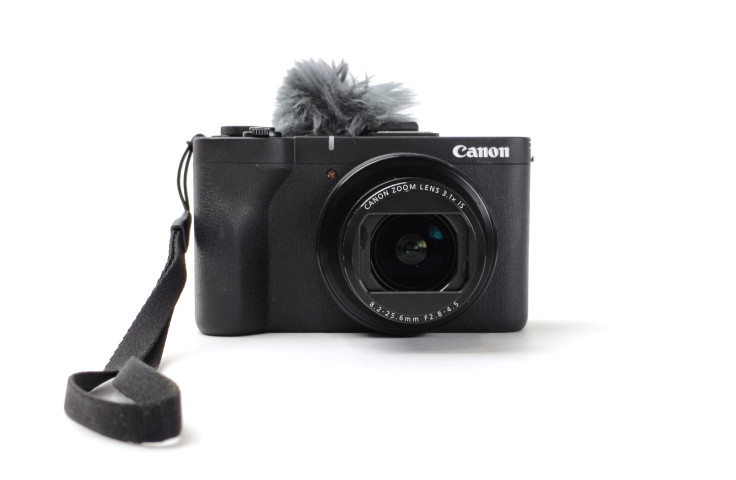
The stabilization also works well for the kind of casual handheld filming I expect many owners to do. Minor hand movements and the small shakes caused by walking were generally not noticeable in my footage, which means I would not consider a gimbal an essential purchase for normal use. A small tripod or grip could still be useful for stationary videos or longer recordings, while an external microphone would be my first addition for dialogue-heavy content.
Even after adding those accessories, the result remains an extremely compact creator setup compared with a conventional mirrorless rig.
Jeff Li
Final Verdict
The Canon PowerShot V1 is a surprisingly complete compact camera for creators who have reached the limits of what they want to do with a smartphone but are not ready to carry a full interchangeable-lens setup. Its greatest strength is not one individual specification, but the combination of very good photo and video quality, extensive manual control, tactile shortcuts, effective stabilization, a responsive articulating touchscreen, creator-friendly connectivity and a body small enough to bring around without much thought.
The video quality is particularly impressive, and features such as the built-in cooling fan, microphone and headphone ports, 4K recording, good handheld stabilization and quick shooting presets make it clear that Canon designed the V1 around people who actually intend to create video regularly. Minor shakes were generally well controlled even while I was walking, which makes the camera much easier to use for spontaneous handheld content without immediately adding more equipment.
It is not perfect. I wanted more zoom, easier manual-focus access and more dependable close-up performance, while some of the physical controls become awkward when operating the camera with one hand. None of those issues, however, made me feel like I needed to build an entire camera rig around the V1 before it became useful.
An external microphone would still be my first accessory for dialogue-heavy videos, while a small tripod or grip is useful when I want completely stationary framing. For beginners, casual creators and anyone looking for a meaningful step beyond smartphone photography and video, however, the PowerShot V1 makes a very convincing argument.
A phone remains easier and a professional rig remains more powerful, but the PowerShot V1 may be more useful precisely because it sits somewhere in between.
David is a tech enthusiast/writer who is often on the move, but since the pandemic is on a mission to explore gadgets to improve his ‘home work’. This is a contribution to an ongoing IBTimes review series on gadgets for Home Productivity.
Frequently Asked Questions
Is the Canon PowerShot V1 good for beginners?
Yes. I found the PowerShot V1 relatively easy to learn despite having much more control than a smartphone. Automatic modes, touchscreen operation and quick presets make it approachable at first, while its manual controls give beginners plenty of room to learn more advanced photography and video techniques over time.
Is the Canon PowerShot V1 better than a smartphone camera?
For convenience, a phone is still difficult to beat. In terms of photographic control, however, I found the PowerShot V1 considerably more capable. The larger sensor, optical lens, physical controls and greater range of manual settings allow far more control over how the final image or video looks, and that difference becomes increasingly noticeable as you start experimenting with the camera’s settings.
Does the Canon PowerShot V1 record 4K video?
Yes. It supports uncropped 4K recording at up to approximately 30fps and cropped 4K at up to approximately 60fps. It can also record high-frame-rate Full HD video at up to approximately 120fps, while Canon Log 3 and 10-bit recording are available for more advanced video workflows.
Does the PowerShot V1 have a cooling fan?
Yes. Canon built a cooling fan directly into the camera to reduce internal temperatures during extended recording. The fan can operate automatically or at selectable speeds depending on the camera settings, making it particularly useful for long interviews, livestreaming and other extended recording sessions.
Is the PowerShot V1 good for vlogging?
Yes. Its wide built-in lens, articulating touchscreen, good handheld stabilization, external microphone support and video-focused controls make it particularly well suited to vlogging. Minor shakes were generally well controlled even while I was walking, so I would not consider a gimbal necessary for ordinary handheld recording.
How much zoom does the PowerShot V1 have?
The built-in lens covers approximately 16-50mm equivalent for still photos and around 17-52mm for video. I found the wide end much more useful than the telephoto end, and the overall zoom range can feel limiting when photographing distant subjects.
Does the Canon PowerShot V1 have a microphone input?
Yes. It has a 3.5mm external microphone input as well as a separate 3.5mm headphone output for monitoring audio. For dialogue-heavy videos, I would still recommend using an external microphone rather than relying entirely on the built-in microphones.
What ports does the Canon PowerShot V1 have?
The camera includes USB-C, Micro HDMI Type-D, a 3.5mm microphone input, a 3.5mm headphone output and Canon’s multi-function accessory shoe. Wi-Fi and Bluetooth are also available for wireless connections and transferring content.
Is the Canon PowerShot V1 good for handheld video?
Yes. I was impressed by the PowerShot V1’s stabilization during normal handheld recording. Minor hand movements and the small shakes caused by walking were generally not noticeable in the resulting footage, making it well suited to casual vlogging, travel videos and other situations where you may be moving while recording. A gimbal could still help with more aggressive movement, but I did not find one necessary for ordinary walking shots.
What accessories should I buy for the PowerShot V1?
For video, my first choice would be an external microphone if the content involves a lot of talking. A compact tripod or grip is also useful for stationary framing and longer recordings, although I would not consider additional stabilization equipment essential for normal handheld use because the camera already does a good job of hiding minor shakes.